Tax Commission
Substitute Tax Forms Guide
General Information
Note: The email address for substitute forms questions and submissions is [email protected].
The guidelines in this document are for developers and programmers of substitute Utah tax forms. These guidelines ensure forms are compatible with the Tax Commission’s automated systems.
The term “form” includes tax returns, schedules, statements, coupons, applications, affidavits and declarations. The Tax Commission does not review, test or approve software logic or confirm calculations on substitute forms. You do not have to register with Utah or complete a letter of intent to submit substitute forms for approval. There is no deadline for submitting forms.
WARNING: The Tax Commission owns the rights to its forms. You must have Tax Commission approval before you may release substitute forms for commercial sale or distribution.
Where to Find Utah Forms
- Get official Utah forms online.
- You can see current drafts of annual Utah forms (when available) and target release dates for finals at Upcoming Forms & Pubs.
Vendor Code & Identification
Replace the default Tax Commission “9999” vendor code (upper-left corner of returns) with your four-digit NACTP vendor code. If you are not registered with NACTP and/or do not have a vendor code, request one by completing an application at nactp.org.
NOTE: If you develop a substitute form that will be used by a single taxpayer/company for filing only their own tax returns, use vendor code “9996.”
On all forms that don’t display the vendor code, print your company’s name, abbreviation or vendor code in the bottom margin of the page, clear of any variable data fields.
Guidelines for Substitute Forms
IMPORTANT: Do not print anything extra on a form or in the top margin. If you must print extra information on a form (e.g., product name, reference numbers, special codes) use only the side or bottom margins.
Original Utah PDFs
We recommend you use original Tax Commission PDFs in your software.
TIP: You can speed up the approval process by noting on your submission you have used original Utah PDFs. We will assign priority status to submissions that use original PDFs.
Reconstructed Forms
If you don’t use original Tax Commission PDFs, please be aware it takes us longer to review reconstructed forms. Each substitute form must match the layout and appearance of the original form. Design your forms to match the official forms as closely as possible. Even slight differences may affect readability on our equipment. We will reject forms our scanners can’t read. If you use printed copies of our forms to compare your substitute forms against, print at full-size.
When reconstructing forms, be aware of the following:
- Proportions – Make the proportions of your forms as close to the official forms as possible. Double-check the widths of your margins, line spacing, indents and kerning.
- Fixed text fonts – For all fixed text, use san-serif fonts (e.g., Arial, Helvetica). Match the font sizes of the official forms as closely as you can. Use bold and/or italic fonts exactly as they appear on the official forms. Match text placement and alignment to the official forms.
- Line breaks – Lines of text in a paragraph must break at the exact location as the official forms.
- Underscores – Do not use underscores in variable data fields if your forms will be completed using computer software.
- Special Symbols – Try to reproduce special symbols (e.g., bullets and arrows) as closely as you can.
- Bar patches – For returns that include a bar patch in the upper-left corner, reproduce the bar patch as closely as you can.
Variable Data Fields
Because Tax Commission systems need to “read” variable data from forms, your variable data must meet the following specifications:
- Variable data font – Variable data must be machine-readable. Use a font size of 10 – 12 points. Use the same font and size for all variable data. Print all alpha characters upper-case.
- Account numbers – Do not include hyphens in account numbers on returns.
- Dates – Enter dates in the exact format shown on the form.Example: for a field showing mm/dd/yyyy, enter Jan. 31, 2026 as 01/31/2026; for a field showing mm/dd/yy, enter Jan. 31, 2026 as 01/31/26; for a field showing mmddyyyy, enter Jan. 31, 2026 as 01312026.
- Blank fields – Do not print anything in fields that contain no data. Do not print zeros in empty amount fields.
- No commas – Enter all amounts without any commas.
- Negative amounts – Indicate negative amounts or losses with a minus sign ( – ). Do not use parentheses or brackets.
- Whole dollars – If amounts on a tax form are rounded to the nearest whole dollar (e.g., income tax forms), do not print decimals or double-zeros for the cents.
- Cents – If amounts on a tax form include cents, use a decimal to separate dollars from cents (e.g., 1234.56 or 1234.00).
- Check boxes – Use a single upper-case “X” to show a response in a check box field.
Foreign Addresses
Enter the foreign city, state/province and postal code in the City field. Abbreviate if necessary. Leave the State and Zip Code fields blank. Enter only the foreign country name in the "Foreign Country" field.
Guidelines for Substitute Coupons
Cut lines above payment coupons must be in the same location as on the original form. Coupon size is 8.5″ wide and 3.5″ to 3.75″ high. On a scale of six lines per inch, the cut line falls between lines 44 and 45.
Withholding Coupons
Each withholding tax payment coupon (TC-941PC) must include a readable OCR-A scan line. See Appendix 1.
Use the test account number 12345678002 when submitting withholding tax coupons. See Appendix 1.
Software that produces the OCR-A scan line must be able to recreate the scan line to exact specifications on each withholding coupon generated by each user.
You must submit two withholding tax coupons with sample taxpayer information for scan line testing (see Requirements, below).
How to Submit
Submit substitute forms in PDF format to: [email protected].
NOTE: You do not need to resubmit forms that are not revised for the current year if you have already received approval.
Requirements
Submit three copies of each form:
- Blank
- Full-filled variable data
- Sample taxpayer information
We will reject submissions that don’t meet the following requirements:
- Include a TC-99, Cover Sheet for Substitute Forms Submissions with each submission.
- Include your NACTP vendor code on the cover sheet and on each return.
- Submit the cover sheet as a separate PDF. Use as many copies as you need to list each form in your submission.
- Do not split multi-page forms into more than one PDF.
- Do not combine multiple tax types in a single submission (e.g., don’t combine corporate tax forms and individual income tax forms).
- Do not break forms packages into multiple submissions (e.g., submit all TC-40 forms and schedules at the same time).
- Produce each page of a form at full-size.
- Do not include instruction pages.
Our Response to You
If we do not approve a form, we will identify the problems and help you correct them. Once you have corrected the errors, you must resubmit the form.
If we conditionally approve a form, we will ask you to correct the form before using it. You do not need to resubmit the form after you make the correction.
We will approve a form only if it meets all substitute form guidelines.
CAUTION: If you use unapproved forms, we may notify the developer, preparer and/or taxpayer, instructing them to re-file on official forms and/or approved substitutes. We may assess a $50 penalty for each non-compliant or unapproved form filed, and late filing penalties may apply.
Appendix 1: Scan Line Specifications for Withholding Tax Coupons
See Appendix 2 for Calculating Check Digits for Utah Withholding Tax Coupons.
The bottom of the scan line must be exactly 1/2″ from the bottom edge and 1/2″ from the right edge of the paper. Do not print anything except the scan line in the bottom 1″ of the form.
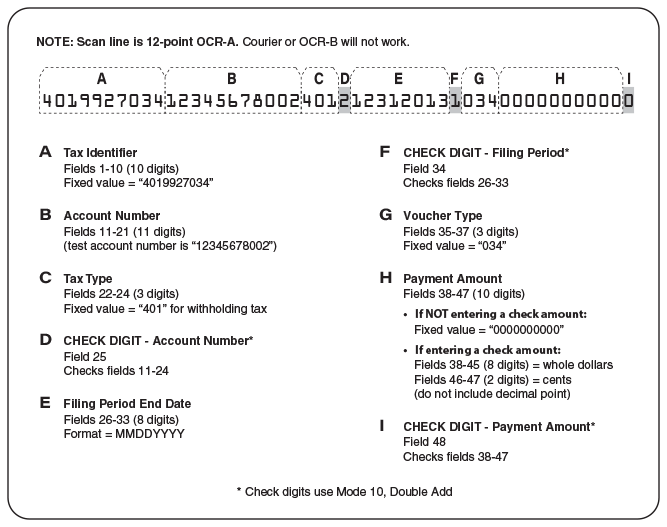
Appendix 2: Calculating Check Digits for Withholding Tax Coupons
The check digit is calculated using MOD 10, Double Add, Product Addition with weights of “1-2-1-2” applied left to right.
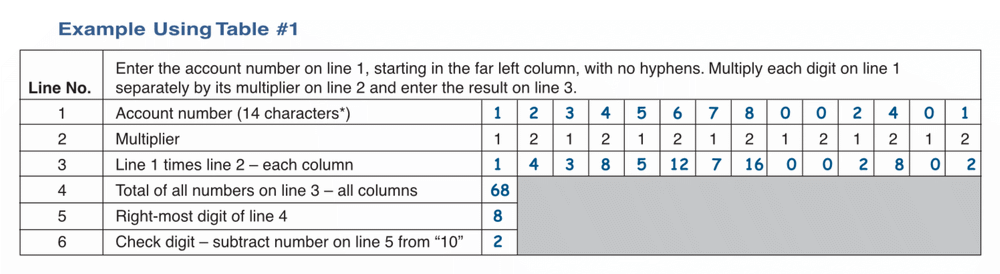
- Use Table #1 to calculate the check digit for the Utah withholding tax account numbers.
- Use Table #2 to calculate the check digit for the filing period end-date only.
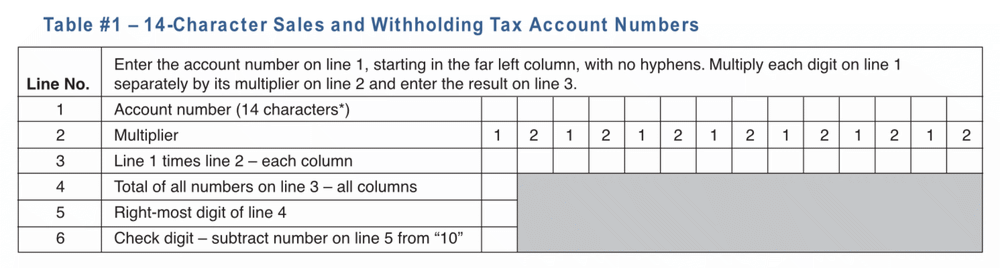
* Replace the “WTH” at the end of the withholding tax account number with “401”. NOTE: Only make this substitution in the scan line. Use “WTH” on any returns or correspondence.
Examples for line 3:
- 6 (on line 1) times 1 (on line 2) equals 6 on line 3
- 8 (on line 1) times 2 (on line 2) equals 16 on line 3
- 0 (on line 1) times 1 or 2 (on line 2) always equals 0 on line 3
Note: If the number on line 4 of the check digit calculation is a multiple of 10, the check-digit is “0.”
Note: Never print hyphens in the scan line, even when an account number includes hyphens.
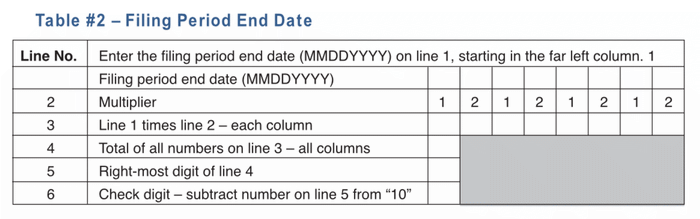
Note: If the number on line 4 of the check digit calculation is a multiple of 10, the check-digit is “0.”