Tax Commission
TAP FAQs
Frequent Questions about Taxpayer Access Point
Please choose a topic to display a list of detailed subjects. Please note that for security reasons, TAP is not available in most countries outside the United States. Please contact us at 801-297-2200 or [email protected] for more information.
TAP FAQ Help for Garnishments
Registration
Why sign up?
Garnishee’s can manage/submit garnishment interrogatories, submit payments, and view correspondence.
How to sign up?
From TAP, scroll to the Garnishments section and click on the “Go to the Garnishments Portal” link. Then click “Sign Up”.
How do I add access to my Garnishee account after I sign up?
After you sign in, the first time, you will be prompted to add access to your Garnishee account. You will need your Garnishee account number and PIN to complete this step.
Where do I get my Garnishee account number?
You can locate your Garnishee account number on the New Account Notification letter we sent you. The number is located in the top-right corner. If you have not received this letter, please contact [email protected].
Where do I find my Garnishee PIN?
Your Garnishee PIN is included in the Administrative Order of Garnishment packet that was served to you. It is located in the Introduction Letter for Administrative Order of Garnishment, in the second paragraph. You may also contact [email protected] to request a new PIN letter.
Can I add Garnishee account access to my existing TAP profile?
No. Your Garnishee account and the Garnishments Portal are separate from other tax accounts and profile. To create access to a Garnishee account, you must sign up for a separate profile in the Garnishments Portal.
Can I receive electronic service through TAP instead of personal service?
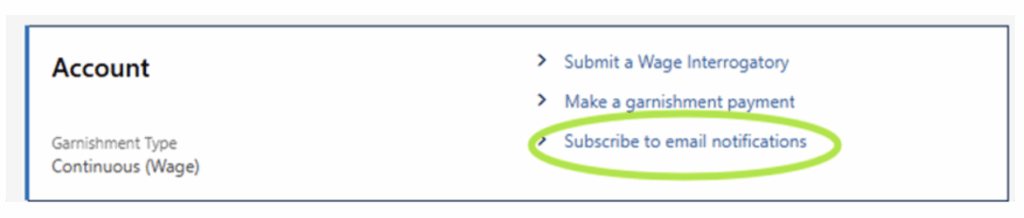
Yes. You can opt in by clicking the link “Subscribe to email notifications” and you will receive an
email each time a new garnishment has been issued. You can then view that garnishment on
your garnishment TAP account.
Answers/Interrogatories
Can I respond to a Garnishment on the Garnishments Portal?
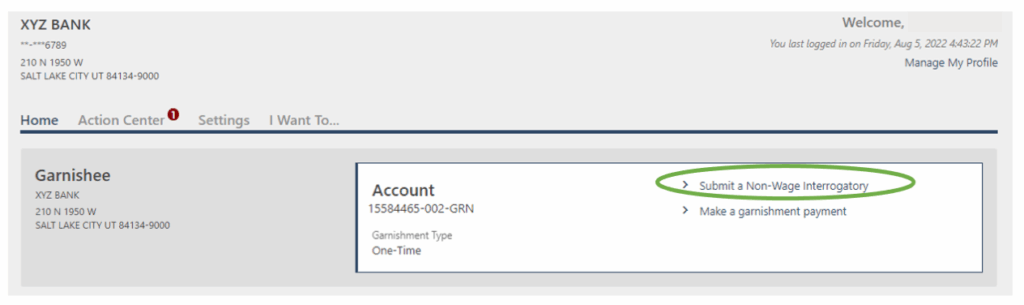
Yes. You can use the Garnishments Portal to respond to a garnishment by signing in and clicking on the “Submit an Interrogatory” link. You can also submit answers/interrogatories by email at [email protected] or US Mail.
Can I view an interrogatory after it’s been submitted on the Garnishments Portal?
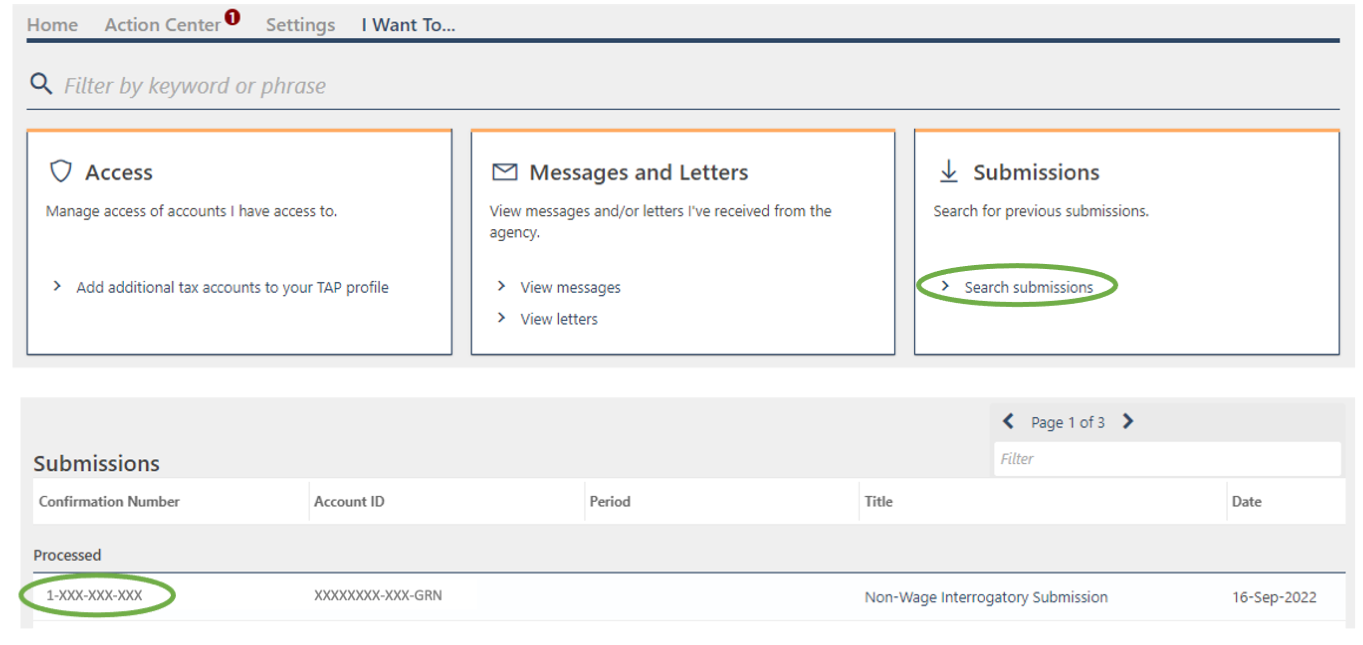
Yes. You can view your previous interrogatories that have been submitted on the Garnishments Portal. After you sign in, click on “I Want To…” and click the “Search Submissions” link.

Can I send a paper interrogatory and still make a payment through the Garnishments Portal?
Yes. However, if you submit answers/interrogatories by email or U.S. mail, we must manually process your answers/interrogatories before you can make a payment through your Garnishments Portal profile.
Payments
Can I make a garnishment payment from the Garnishments Portal?
Yes. You can pay using a bank account or card. Bank account payments are free to use. Card payments have a 3% convenience fee, charged by the processor. After you sign in, click “Make a Garnishment Payment”.

Can I make one payment for multiple debtors’ garnishments?
Yes. You can make one payment for one debtor or make one payment for multiple debtors. After you sign in, click “Make a Garnishment Payment”.

What to do if I am the individual or business being garnished.
If you are being garnished and have questions, please contact your assigned collection agent. If you do not know who your agent is, please contact us at [email protected] or by phone 801-297-6274.